Cookie settings

Workflow Platform for
Enterprise Applications & Business Processes

Model and automate business processes with BPMN, streamline operational workflows, and connect enterprise applications, ERP systems, and AI Agents into seamless end-to-end process execution – all on a centralized Industrial Application Platform.
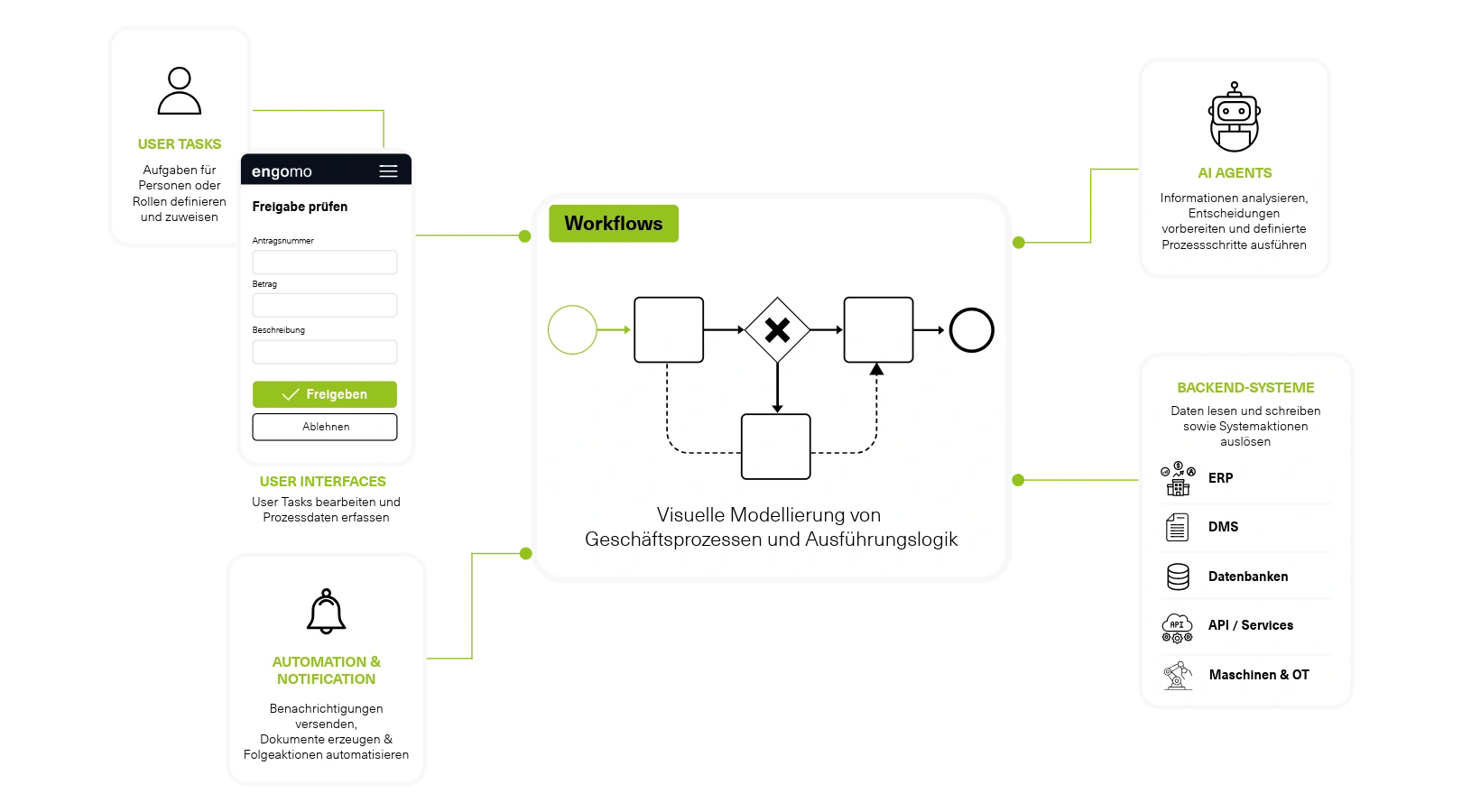
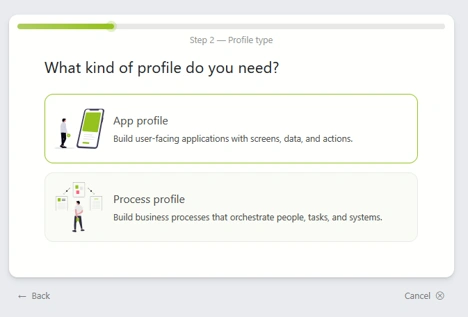
Illustration of an engomo workflow showing BPMN process orchestration with user tasks, enterprise apps, automation, AI agents, and ERP, API, database, and OT system integrations for business process execution.
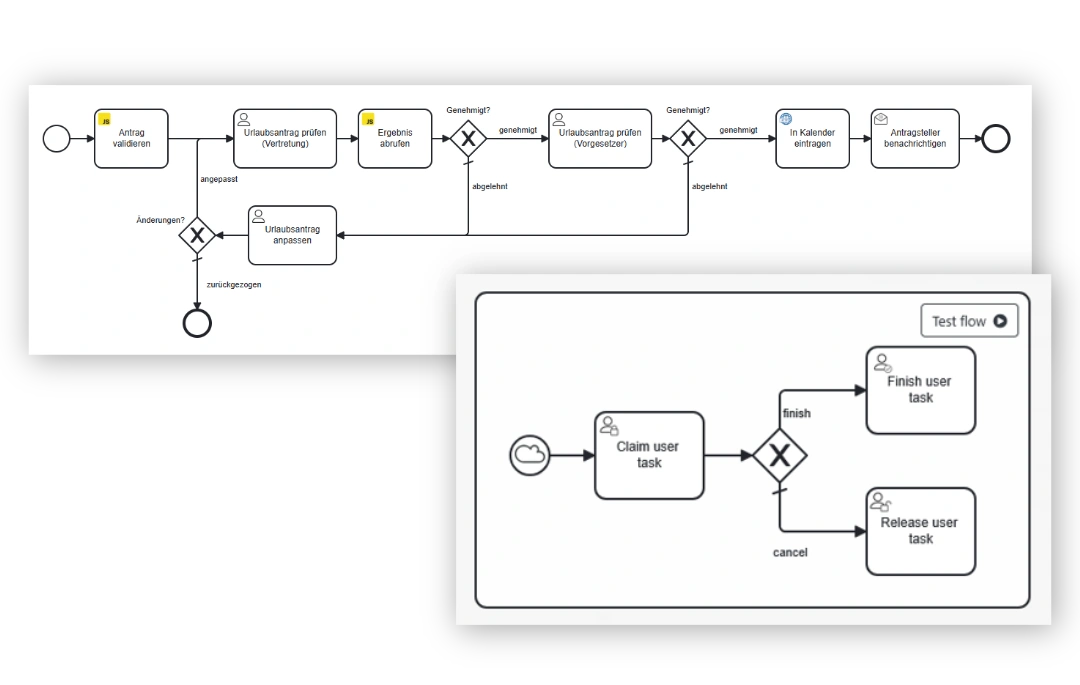
Screenshot of a BPMN-based workflow in engomo showing approvals, user tasks, decision gateways, and automated process steps for business process modeling and execution.
From Business Processes to Operational Execution

Not every business process has the same requirements. While some processes follow clearly defined rules and coordinate multiple stakeholders, operational workflows require employees to react flexibly to changing situations. That's why engomo combines two complementary workflow approaches within a single workflow engine – allowing organizations to start either from the business process or from the enterprise application.

  • It is an icon that shows a green circle with a white check mark inside.

    Process Workflows: For structured approval, authorization, and quality management processes where multiple users, roles, and systems collaborate within a predefined workflow.

  • It is an icon that shows a green circle with a white check mark inside.

    Action Flows: For enterprise applications where employees need to work flexibly, capture data, and execute business logic and system integrations directly within the application.
  • Icon representing a unified platform for business processes, enterprise applications, and workflows.

    Processes & Apps Unified

    No disconnected workflow and application solutions. From business process modeling to operational execution, everything is managed on one centralized platform.

    Icon representing AI-powered creation of enterprise applications and action flows with the engomo App Building Agent.

    AI-Powered Implementation

    The App-Building Agent automatically generates Action Flows during application development, accelerating the implementation of complex business logic while keeping every workflow transparent and editable.

    Icon representing end-to-end integration of ERP systems, applications, machines, AI agents, and enterprise systems.

    End-to-End Integration

    Connect ERP systems, machines, users, AI Agents, and third-party applications into seamless end-to-end business processes.
    Icon representing reusable workflow and process components for standardized business logic.

    Reusable Process Components

    Bundle modeled workflows and execution logic into reusable Low-Code Plugins and reuse them across applications and Action Flows. This reduces configuration effort while ensuring consistent business processes.
    Icon representing controlled workflow execution with versioning, governance, reviews, and approvals.

    Controlled Execution

    Versioning, reviews, and approval mechanisms ensure controlled changes while providing transparency, governance, and long-term maintainability throughout the application lifecycle.
    Screenshot from engomo showing a BPMN diagram used to define execution logic, with a green wave graphic in the foreground.
    Process Workflows

    Process Workflows provide the foundation for structured business processes, ensuring that tasks, decisions, and approvals are executed transparently, consistently, and automatically. With the integrated BPMN Designer, you can visually model business processes and execute them directly – including approvals, decision points, escalations, and automated process steps.

  • It is an icon that shows a green circle with a white check mark inside.

    Visually model business processes and workflows with the BPMN Designer

  • It is an icon that shows a green circle with a white check mark inside.

    Create User Tasks for structured employee task execution

  • It is an icon that shows a green circle with a white check mark inside.

    Automate process steps and interact directly with ERP and third-party systems

  • It is an icon that shows a green circle with a white check mark inside.

    Build user interfaces in engomo to execute process tasks

  • It is an icon that shows a green circle with a white check mark inside.

    Automate notifications, escalations, and task assignments

  • Action Flows for Application Logic

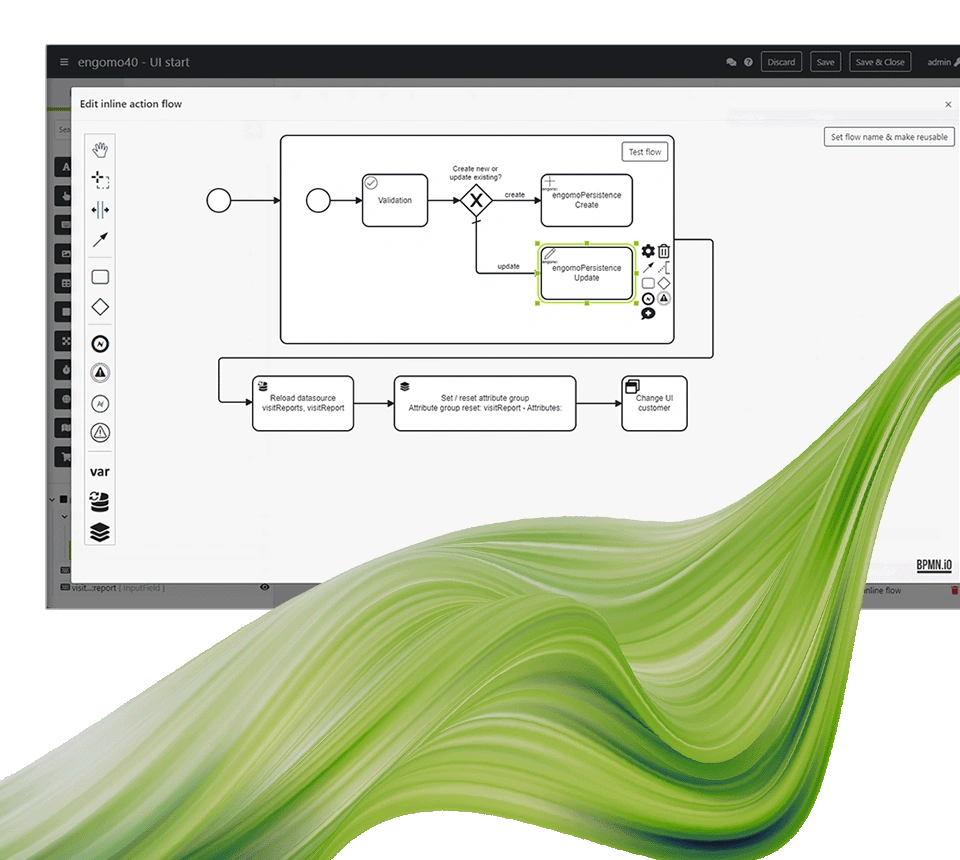
    While Process Workflows orchestrate the entire business process, Action Flows define the execution logic within individual enterprise applications. They control how applications interact with enterprise systems, process data, and execute business rules. Action Flows can be modeled manually or generated automatically by the engomo App-Building Agent. The generated application logic remains fully transparent and can be reviewed, modified, extended, or versioned at any time.

  • It is an icon that shows a green circle with a white check mark inside.

    AI automatically generates Action Flows from business requirements

  • It is an icon that shows a green circle with a white check mark inside.

    Bundle workflow logic into reusable Low-Code Plugins

  • It is an icon that shows a green circle with a white check mark inside.

    Automate processes with webhooks and scheduled tasks

  • It is an icon that shows a green circle with a white check mark inside.

    Integrate AI services and AI Agents into Action Flows
  • Screenshot from engomo showing a BPMN diagram used to define execution logic, with a green wave graphic in the foreground.
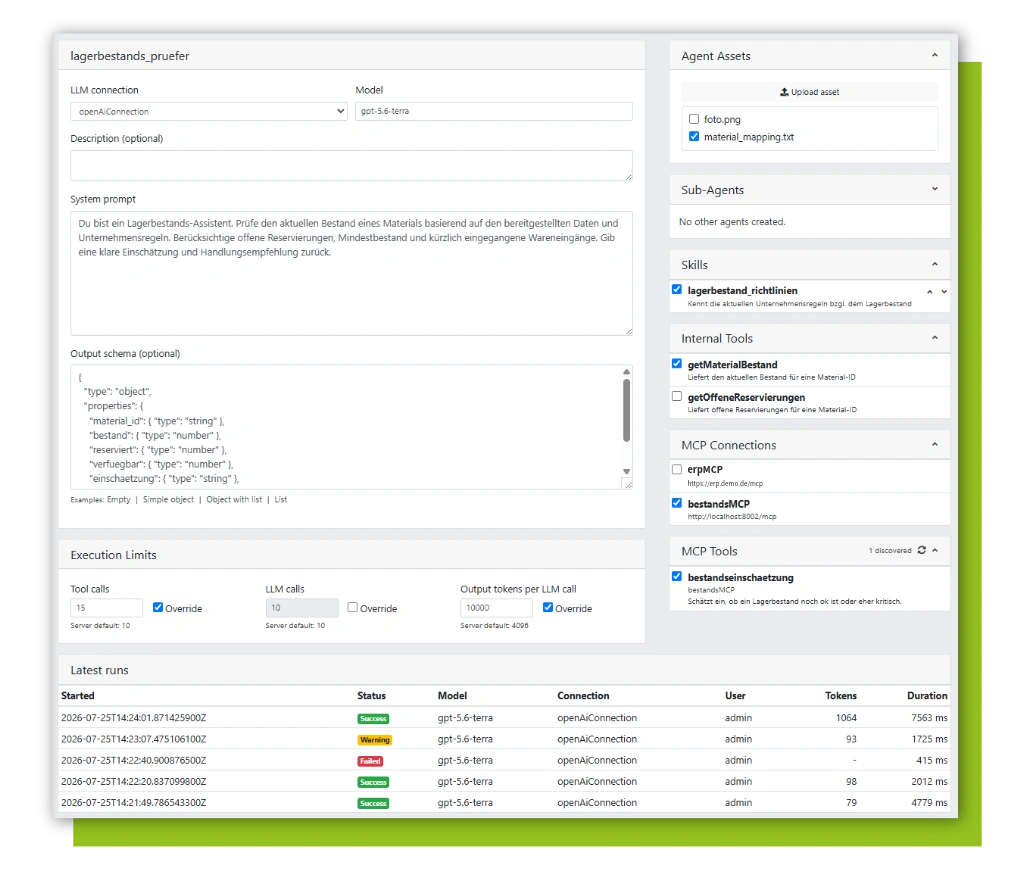
    Screenshot of the engomo AI Agent Builder for configuring industrial AI agents with LLM selection, system prompts, enterprise knowledge, tools, MCP integrations, and governance settings.
    Bring AI Agents into your business processes.

    AI Agents extend your workflows with intelligent analysis, decision support, and automation capabilities. They help employees handle repetitive tasks and enable organizations to execute business processes more efficiently and intelligently—while maintaining full transparency and governance. Examples:

  • It is an icon that shows a green circle with a white check mark inside.

    Analyze documents and extract key information

  • It is an icon that shows a green circle with a white check mark inside.

    Classify emails automatically

  • It is an icon that shows a green circle with a white check mark inside.

    Prepare decisions based on predefined business rules

  • It is an icon that shows a green circle with a white check mark inside.

    Intelligently select or prioritize process paths

  • It is an icon that shows a green circle with a white check mark inside.

    Summarize information

  • Request Demo

    Get to know engomo live and request an online demo right here.
  • It is an icon that shows a green circle with a white check mark inside

    Book your 35-minute live demo

  • It is an icon that shows a green circle with a white check mark inside

    Experience the engomo Platform

  • It is an icon that shows a green circle with a white check mark inside

    Examples of Custom App Solutions

  • It is an icon that shows a green circle with a white check mark inside

    Answers to your specific questions

  • What to expect

    First name

    *

    Last name

    *

    Company

    *

    Business email

    *

    Phone number

    *

    Which topics are particularly important to you?

    engomo GmbH stores and processes the personal data you provide in order to contact you regarding our products and services and to process your request. Information about our data protection practices and our commitment to protecting your privacy can be found in our privacy policy.
    Frequently Asked Questions About Workflow Automation

    Learn more about workflow automation, business process automation, Process Workflows, Action Flows, the BPMN workflow engine, AI Agents, ERP integration, and Enterprise Apps with engomo. Find answers to the most common questions about digitizing industrial workflows and building scalable Enterprise Apps.

    What is the difference between Process Workflows and Action Flows?

    Process Workflows use a BPMN workflow engine to model, orchestrate, and execute end-to-end business process automation. They coordinate tasks, approvals, decisions, and handoffs across users, departments, and enterprise systems. Action Flows define the application logic within Enterprise Apps, powering ERP integration, data validation, business rules, and automated workflow steps. Together, Process Workflows and Action Flows provide a complete framework for workflow automation—from process design to operational execution.

    Which use cases are Process Workflows best suited for?

    Process Workflows are ideal for workflow automation scenarios that follow structured business processes involving multiple users, roles, or connected systems. Typical use cases include approval workflows, invoice processing, leave requests, quality management, complaints handling, engineering change requests, and other business process automation initiatives. Using BPMN, these workflows are visually modeled, directly executable, and seamlessly integrated with Enterprise Apps, ERP systems, and AI Agents.

    Does engomo support BPMN?

    Yes. engomo includes a BPMN workflow engine that enables organizations to visually model, version, and execute business processes based on the BPMN standard. Instead of creating static process documentation, you build executable workflows that connect users, Enterprise Apps, ERP integration, AI Agents, and automated business logic in a single operational environment.

    How do Process Workflows and Enterprise Apps work together?

    A BPMN workflow creates user tasks that are assigned to employees. These tasks are completed within an engomo Enterprise App or web application. After each task is finished, the workflow automatically advances to the next defined process step. This architecture separates workflow orchestration from the user interface, enabling independent development, easier maintenance, and scalable business process automation.

    Can the App-Building Agent generate Action Flows automatically?

    Yes. The engomo App-Building Agent automatically generates Action Flows from business requirements using AI-powered application development. The generated execution logic remains fully transparent and can be visually reviewed, modified, and extended at any time. This combines AI-driven development speed with enterprise-grade governance, maintainability, and operational reliability.

    What role do AI Agents play?

    AI Agents are embedded directly into Process Workflows to enhance workflow automation with intelligent decision support. They analyze documents, classify information, prepare decisions, summarize content, and automate repetitive tasks. This enables smarter business process automation while preserving governance, transparency, compliance, and human oversight.

    Can existing enterprise systems such as ERP be integrated?

    Yes. engomo provides seamless ERP integration by connecting workflows with ERP, CRM, DMS, MES, and other enterprise systems through standard connectors and interfaces such as REST, SOAP, and JDBC. This enables true end-to-end business process automation and industrial workflows without manual data transfers, disconnected systems, or media breaks.